Mineprint
Tu as construit quelque chose dans Minecraft ? Ici, tu le fais sortir de l'écran : il devient un objet que tu tiens dans ta main. You built something in Minecraft? Here, you take it out of the screen: it becomes an object you can hold in your hand.
Ton fichier reste sur ton ordinateur. Pas de compte, pas de pub. Your file stays on your computer. No account, no ads.
L'outilThe toolDu fichier à l'objetFrom file to object
Ton objet apparaît iciYour object shows up here
Tourne avec le doigt ou la sourisDrag to turn
Taille d'un blocSize of one block
3 mm
- BlocsBlocks
- –
- Dimensions
- –
- Objet impriméPrinted object
- –
- Triangles
- –
Télécharger le STLDownload the STL
Le STL s'ouvre dans le logiciel de l'imprimante 3D (Bambu Studio, Elegoo Slicer, Cura…).
The STL opens in your 3D printer's software (Bambu Studio, Elegoo Slicer, Cura…).
Les sortes de blocsKinds of blocks
Chaque sorte devient de la matière, ou pas. Les blocs fins (fleurs, herbe, torches) sont décochés : trop petits pour l'imprimante. Tu peux changer d'avis.
Each kind becomes material, or not. Thin blocks (flowers, grass, torches) are unticked: too small for the printer. You can change your mind.
L'outil demande un navigateur récent (Chrome, Safari, Firefox ou Edge des trois dernières années). S'il refuse ton fichier, essaie un autre navigateur.
The tool needs a recent browser (Chrome, Safari, Firefox or Edge from the last three years). If it refuses your file, try another browser.
Dans MinecraftIn MinecraftCrée ton fichierCreate your file
1
Ouvre un monde où les commandes sont autorisées (« Allow Commands: ON » dans les réglages du monde, ou un monde en Créatif).
Open a world where commands are allowed ("Allow Commands: ON" in the world settings, or a Creative world).
2
Appuie sur 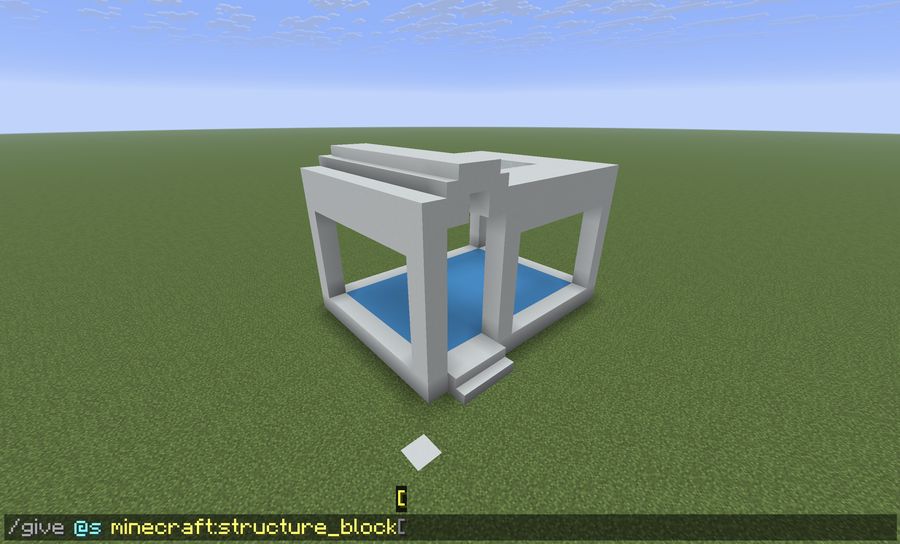 Press
Press
T et tape cette commande : tu reçois un bloc de structure./give @s minecraft:structure_block
Press T and type this command: you get a structure block./give @s minecraft:structure_block
3
Pose-le par terre, juste devant un coin de ta construction, pas dedans.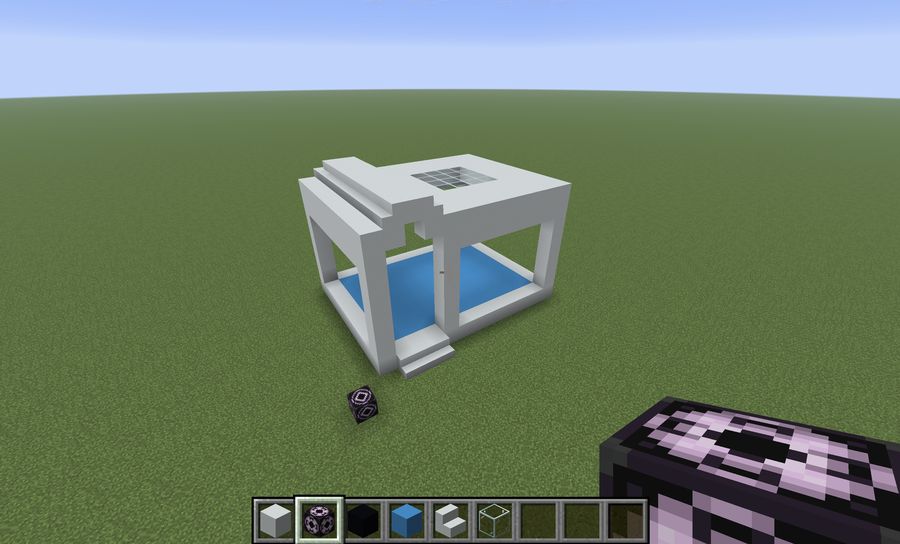 Place it on the ground, right in front of a corner of your build, not inside it.
Place it on the ground, right in front of a corner of your build, not inside it.
4
Clic droit dessus. En bas à gauche, clique sur « Load », puis encore une fois sur « Corner ». Le panneau qui s'ouvre est celui qu'il te faut.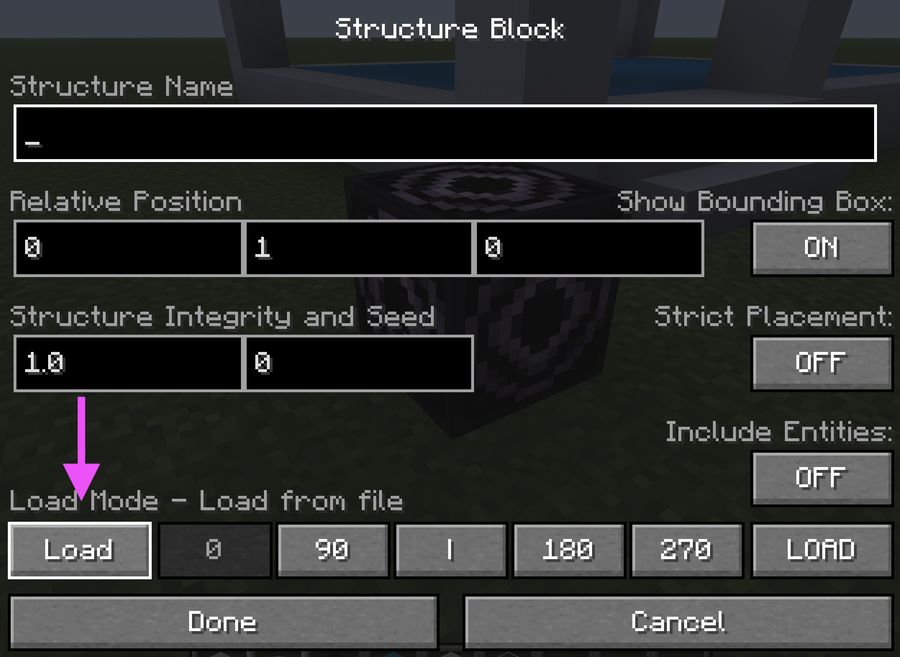 À l'ouverture : on clique sur « Load ».
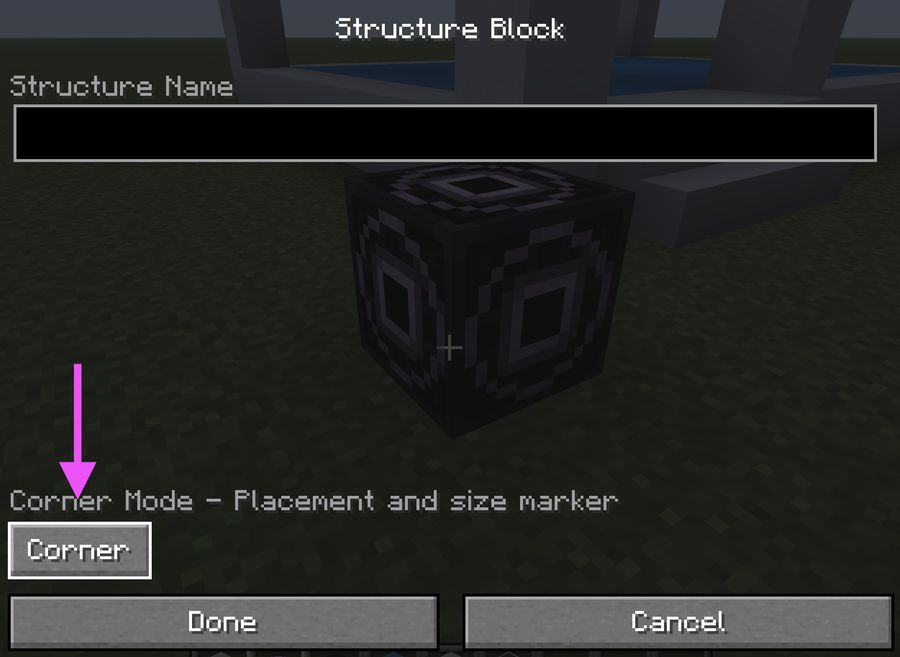 Encore un clic, sur « Corner ».
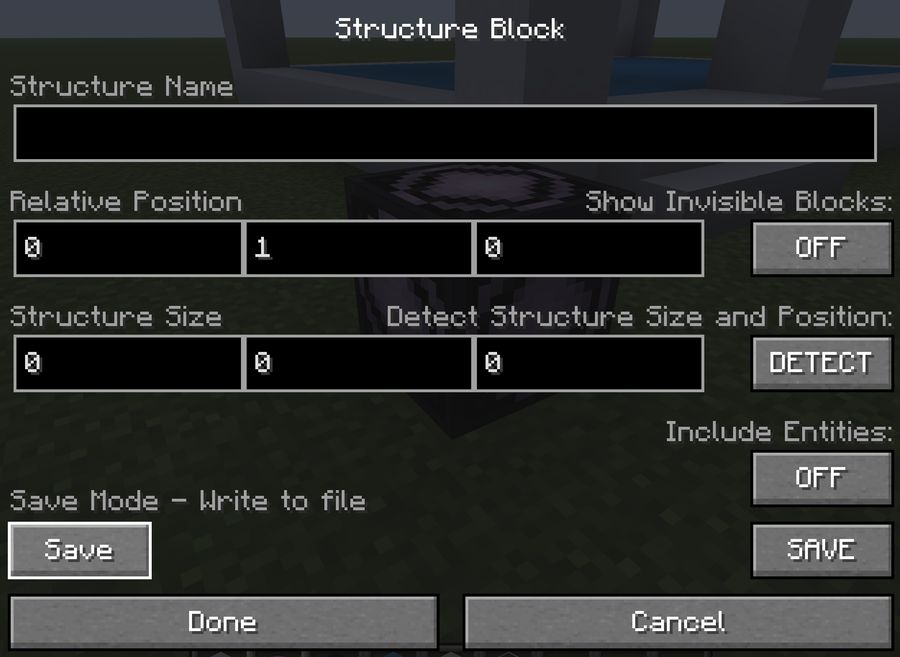 C'est sur ce panneau qu'on travaille.
Right-click it. At the bottom left, click "Load", then once more on "Corner". The panel that opens is the one you need.When it opens: click "Load".One more click, on "Corner".This is the panel we work on.
C'est sur ce panneau qu'on travaille.
Right-click it. At the bottom left, click "Load", then once more on "Corner". The panel that opens is the one you need.When it opens: click "Load".One more click, on "Corner".This is the panel we work on.
À l'ouverture : on clique sur « Load ».Encore un clic, sur « Corner ».C'est sur ce panneau qu'on travaille.
Right-click it. At the bottom left, click "Load", then once more on "Corner". The panel that opens is the one you need.When it opens: click "Load".One more click, on "Corner".This is the panel we work on.
5
Donne un nom en minuscules, sans espace (le jeu ajoute « minecraft: » tout seul). Si vous êtes plusieurs dans le même monde, chacun le sien, sinon le fichier d'un autre écrase le tien : ton prénom et l'objet, par exemple 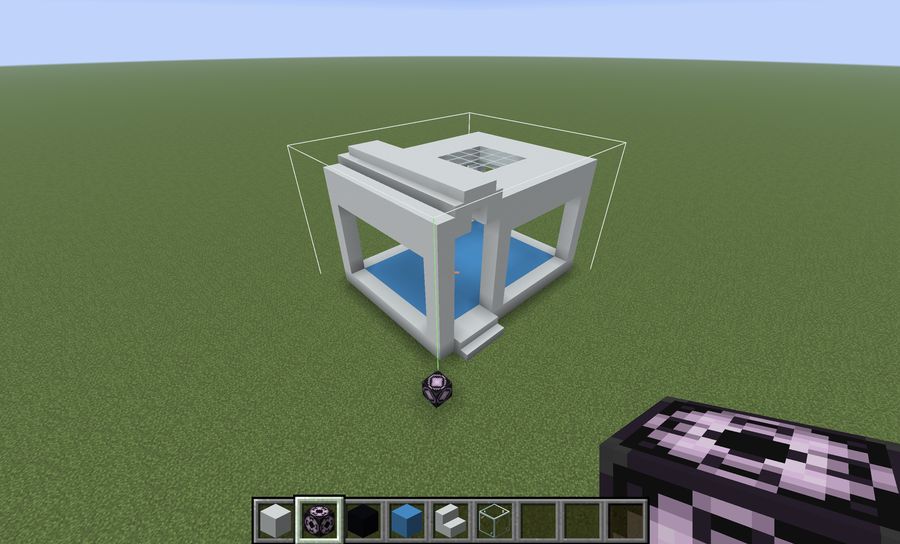 Give it a lowercase name, no spaces (the game adds "minecraft:" by itself). If several of you share the same world, each picks their own, or someone else's file overwrites yours: your first name and the object, like
lea-tour. « Relative Position » dit où commence le cadre par rapport au bloc, « Structure Size » sa taille. Change les nombres jusqu'à ce que le cadre blanc enveloppe tout. Trop grand ne gêne pas : l'air ne compte pas. Un -1 en hauteur prend aussi le sol, qui devient un socle.
Give it a lowercase name, no spaces (the game adds "minecraft:" by itself). If several of you share the same world, each picks their own, or someone else's file overwrites yours: your first name and the object, like lea-tower. "Relative Position" says where the frame starts from the block, "Structure Size" how big it is. Change the numbers until the white frame wraps everything. Too big is fine: air doesn't count. A -1 in height also takes the ground, which becomes a base.
6
Clique « SAVE » à droite, puis « Done ». Ton fichier existe. Reste à aller le chercher.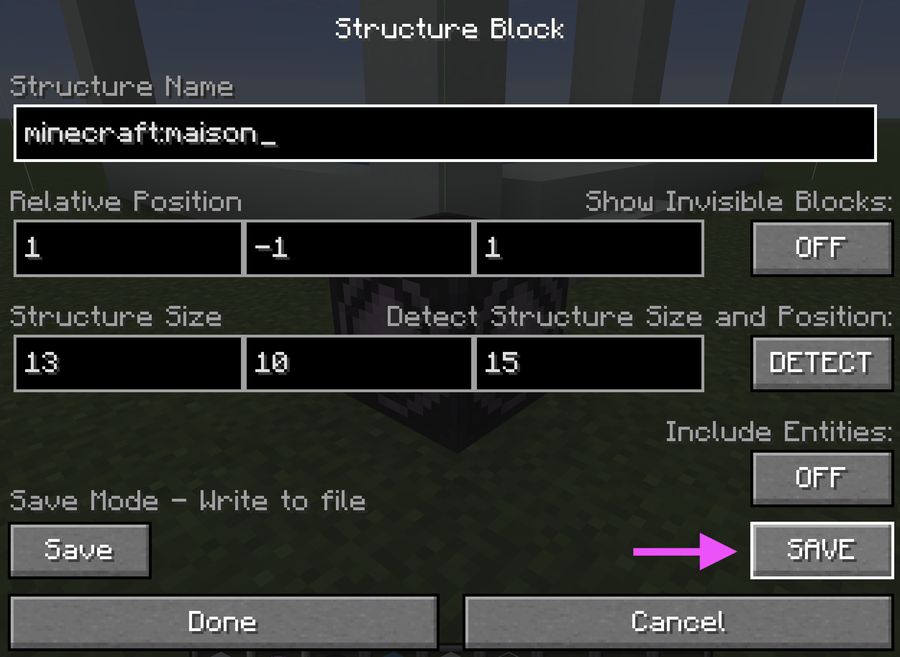 Click "SAVE" on the right, then "Done". Your file exists. Now go and get it.
Click "SAVE" on the right, then "Done". Your file exists. Now go and get it.
Sur l'ordinateurOn the computerRécupère ton fichierGet your file
1
Minecraft range les fichiers dans un dossier caché. On y va par un raccourci, pas en cliquant. Choisis ta ligne : Mac ou Windows.
Minecraft keeps the files in a hidden folder. You get there with a shortcut, not by clicking. Pick your line: Mac or Windows.
2
Mac : dans le Finder, 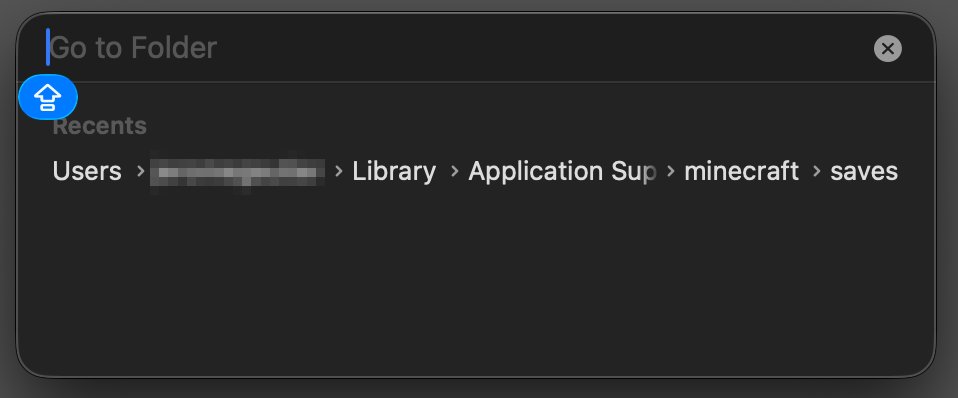 Cmd + Maj + G ouvre cette fenêtre.
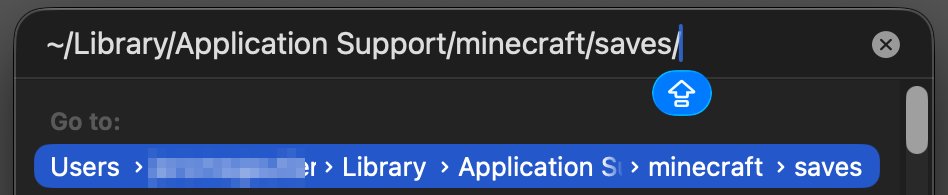 Colle le chemin, puis Entrée.
Mac: in the Finder, Cmd + Shift + G opens this window.Paste the path, then Enter.
Colle le chemin, puis Entrée.
Mac: in the Finder, Cmd + Shift + G opens this window.Paste the path, then Enter.
Cmd + Maj + G, colle ce chemin, Entrée.~/Library/Application Support/minecraft/saves/Cmd + Maj + G ouvre cette fenêtre.Colle le chemin, puis Entrée.
Mac: in the Finder, Cmd + Shift + G, paste this path, Enter.~/Library/Application Support/minecraft/saves/Cmd + Shift + G opens this window.Paste the path, then Enter.
3
Windows : touche
Windows + R, colle ce chemin, Entrée.%appdata%\.minecraft\saves
Windows: press Windows + R, paste this path, Enter.%appdata%\.minecraft\saves
4
Ouvre le dossier de ton monde, puis
generated, minecraft, structure. Ton fichier est là, avec le nom que tu as donné et .nbt au bout.
Open your world's folder, then generated, minecraft, structure. Your file is there, with the name you gave it and .nbt at the end.
5
Glisse-le dans la première carte, tout en haut. Ton objet apparaît.
Drop it into the first card, at the top. Your object appears.
À toiYour turnConstruis, cadre, imprimeBuild, frame, print
1
Construis quelque chose de solide : des murs, un pont, une tour, un animal en blocs. Ce qui tient dans Minecraft ne tient pas toujours en vrai : un bloc qui flotte tombera.
Build something solid: walls, a bridge, a tower, a blocky animal. What stands in Minecraft doesn't always stand for real: a floating block will fall.
2
Cadre-le avec le bloc de structure, glisse le fichier ici, et tourne ton objet dans tous les sens. Il ressemble à ce qu'il sortira de l'imprimante.
Frame it with the structure block, drop the file here, and turn your object around. It looks like what will come out of the printer.
3
Choisis la taille d'un bloc. À 3 mm, une maison de 10 blocs fait 3 cm : petit, vite imprimé. Regarde la ligne « Objet imprimé » changer pendant que tu pousses le curseur.
Pick the size of one block. At 3 mm, a 10-block house is 3 cm: small, quick to print. Watch the "Printed object" line change as you move the slider.
4
Télécharge le STL, imprime-le, et tiens-le dans ta main. Compare avec l'écran : qu'est-ce qui est pareil, qu'est-ce qui a changé ?
Download the STL, print it, and hold it in your hand. Compare with the screen: what's the same, what changed?
ComprendreUnderstandCe que fait l'outilWhat the tool does
1
Dans Minecraft, un bloc est un cube. L'outil ne garde que les faces qui touchent l'air : l'intérieur d'un mur n'existe pas pour lui. Regarde ton objet : aucune face cachée.
In Minecraft, a block is a cube. The tool only keeps the faces that touch air: the inside of a wall doesn't exist for it. Look at your object: no hidden faces.
2
Un fichier STL, c'est une liste de triangles, rien d'autre. Chaque face carrée en fait deux. Ton objet en a … : c'est le nombre affiché à côté de l'aperçu.
An STL file is a list of triangles, nothing else. Each square face makes two. Your object has …: that's the number next to the preview.
3
L'imprimante pose la matière couche par couche, de bas en haut. Ce qui est dans le vide (une arche, un toit qui dépasse) a besoin de supports : le logiciel de l'imprimante les ajoute, et tu les casses à la fin.
The printer lays material layer by layer, bottom to top. Whatever hangs in the air (an arch, an overhanging roof) needs supports: the printer software adds them, and you snap them off at the end.